Prime Rig V3
WindowsmacOS
US$ 11one-time payment
Get Prime Rig V37-day money-back guarantee · Purchase via Hotmart
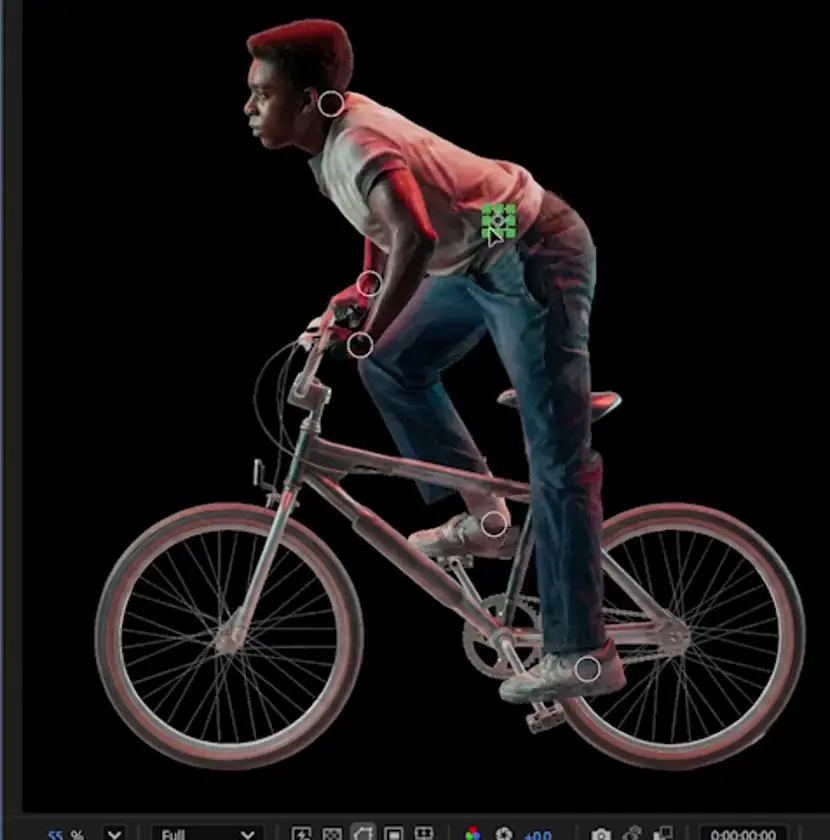 Unable to play the preview.
7-day money-back guarantee · Purchase via Hotmart
PRIME RIG V3 · AFTER EFFECTS PLUGIN
Stop building every control from scratch. With your character parts prepared, create the rig in under 5 minutes with Prime Rig and start animating.
FROM ARTWORK TO ANIMATION
Building every control and connecting everything by hand takes time away from animating. Prepare and identify the parts: Prime Rig automates rig creation, from a single limb to the whole body.
Separate the parts into layers and position the anchor points at the joints. The plugin does not cut out a flattened image.
Select the limb's layer in After Effects and click the matching part in the Prime Rig panel.
Once mapping is complete, use Auto Rig to create the controls and get the character ready to animate.
Use the controls generated in the composition. The plugin prepares the rig; you create the movement and animation.
The demonstration for step 04 will be added soon.
LESS REPETITIVE WORK
Rig only the limbs you need, connect the chosen part and add others as you prepare the character.
IK lets you control an arm or leg chain using the hand or foot control.
Adjust size, color, thickness and opacity, with global and individual options.
Adjust the identification of the parts. Correcting the mapping is a separate action from removing the rig.
For Windows and macOS · Installation guide included.
7-day money-back guarantee · Purchase via Hotmart
FAQ
Yes. Prepare the parts and joints. The plugin does not automatically cut out an image or rig 3D models.
No. You can start with individual limbs and build in stages.
No. It creates the structure and controls for you to animate.
In the visual workflow, you assign each layer to the corresponding part on the panel. You do not need to prepare all 15 parts to start with a single limb.
Native controls and expressions are saved in the project. The panel is used to create and manage the rig. When transferring a project, also check the After Effects version, media files and any other effects used.
Your download includes the package and guide for your system: an installer and manual alternative for Windows; manual installation for macOS.
Support covers installation, operation and technical issues with the plugin. Contact contato@motionmaster.com.br. Support does not include private lessons or animation production.